What is the Pathway Planner triage tool?
The Pathway Planner Model
The Careerpilot Pathway Planner is a model and online tool, which assess the career guidance needs of year 10+ students to help schools/colleges provide effective, efficient and targeted personal guidance to meet the individual needs of young people, using triage and a whole-school, integrated approach.
The Pathway Planner helps careers leaders/SLT use data to identify the guidance needs of students – at three levels, saving staff time and ensuring students receive the guidance they need.
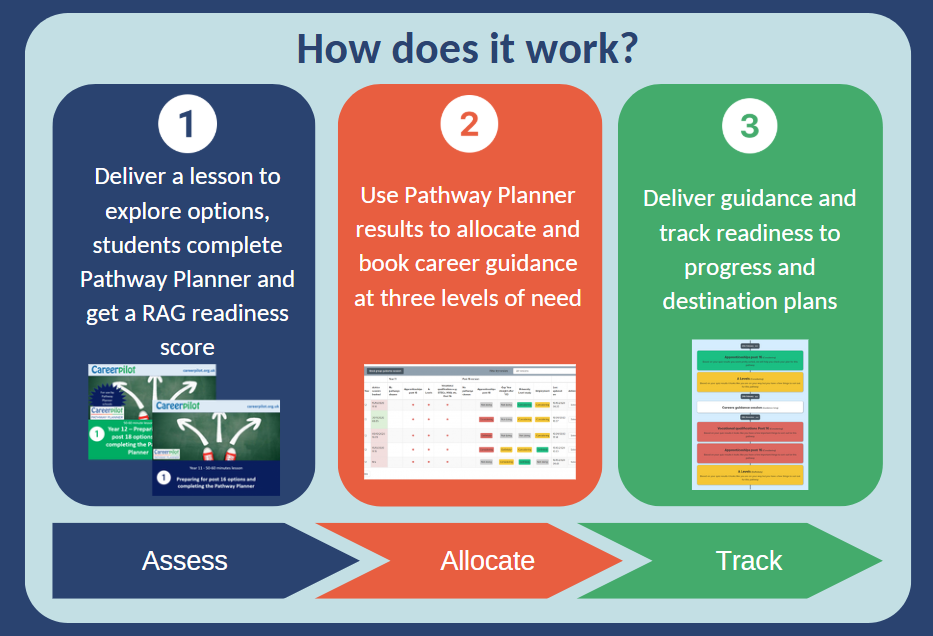
The three stage Pathway Planner model explained
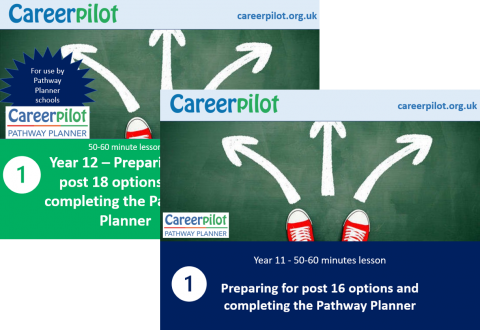
1. One-hour lesson - explore options, complete the Pathway Planner, students receive a RAG readiness score.
School deliver a 1 hour structured option choices and Pathway Planner session to Y11 or Y12 (you can also use the Pathway Planner at the end of Y10). The lesson summarises future options and enables students to explore those of interest to them on Careerpilot (individual access to carreerpilot.org.uk required).
In the last 10-15 minutes of this lesson students complete the Pathway Planner quiz, which is accessed through their Careerpilot account (within Career Tools - if this has been set up for them by the school). This asks them which pathways they are interested in and they complete 'quiz' questions to see how ready they are for their chosen pathway. Students receive a red, amber, green score for each pathway and a pop-up to tell them they will all be getting a guidance session.
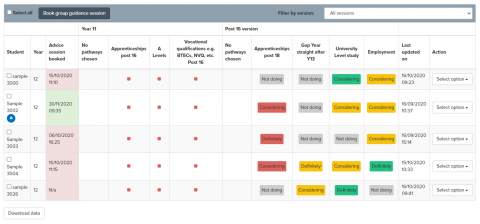
2. Use data reports to allocate career guidance at three levels - book sessions on the site
The Careers Adviser/Career Leader can then view a report of the pathways students are interested in and see the 'red, amber, green' score showing how ready students are for each pathway. This information can be used, alongside other available school information, to offer three levels of guidance according to student need. We suggest you allocate guidance based on the 'definite' pathway if there is one e.g if a student is definite and green then they will get the shorter 'check of plan' guidance, if they are definite and red they will be allocated the longer guidance session. It is up to a school to decide how long they allocate to red, amber, green but in the pilot schools gave 20 minutes for green, 30 for amber and 60 for red.
Reports also show student's answers to the quiz questions so careers staff can see where the barriers might be and address them in the career guidance session. In addition to 1:1 sessions a school could offer group work sessions to support students with a similar issue e.g. if 10 students indicate they are not sure about funding for HE. The RAG data can also be used to help a school see how to improve their careers programme e.g. if there are a lot of 'reds' for the apprenticeship pathway then maybe the students need more input on this before they complete the Pathway Planner.
All guidance sessions can be booked and recorded within the Pathway Planner section of the Reporting Zone and all career sessions will be recorded on the student's Pathway Planner timeline
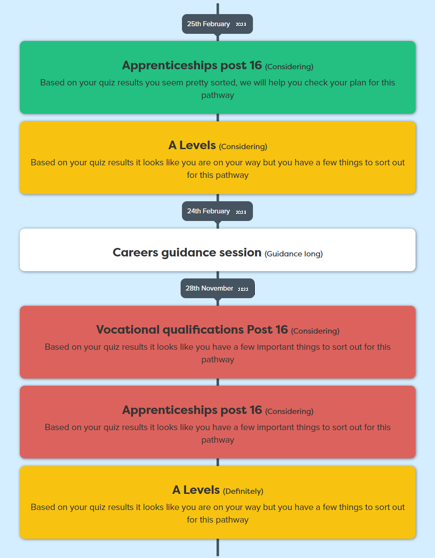
3. Deliver guidance and track how your student's needs are being met and show how your support is helping them be well-prepared for their next step
The system offers a range of tools to manage the booking and guidance process and can generate reports to show the next step plans of students before and after guidance through the visual, individual, timeline and also through a progression report which can be viewed/downloaded for any group e.g TG, year group. The Progression Report will summarise the intended pathway destination students are working towards - useful to share with tutors/head's of year but also can be used to track intended destinations. Additional reports allow all reports and actions written through the guidance sessions to be attached to the student's Careerpilot account and shared with other staff members.
Signing up for the Pathway Planner
Training - How to get started using the Pathway Planner
It is a requirement for all schools wishing to have access to the Pathway Planner that they view the 'How to get started' training videos. The training will take you through six stages that will equip you to manage and make best use of the Careerpilot Pathway Planner:
- Overview of Careerpilot and the Pathway Planner;
- The one-hour lesson in which the students complete the Pathway Planner;
- How to access the Reporting Zone, Pathway Planner reports and how to allocate guidance at three levels;
- The career adviser's role, recording progression plans and involving tutors;
- Staff and student registration, setting up groups and giving access to staff;
- Accessing resources and support.
Following the training sessions your access to the Pathway Planner will be switched on. Request 'How to get started with the Pathway Planner' training by emailing careerpilot@bath.ac.uk
The role of a Career Adviser in the Pathway Planner process:
The Pathway Planner is a great tool for integrating the work of the Career Adviser with other school activities. The Pathway Planner lesson will generate useful information about the individual student's interest, choices and plans which will inform the career adviser before they meet the student.
Before the career adviser meets the student they can access any useful information about the student's interests and plans on Careerpilot and also view the Pathway Planner results to see answers to progression questions so they will know in advance what support the student might need.
During the guidance Careerpilot can be used to support the guidance process e.g skills quiz, what subjects they love, exploring jobs, setting action points, etc.
After the session the career adviser should:
- Ask the students to login to Careerpilot and edit they Pathway Planner responses (this will show the impact of the the session as they move through the RAG, and any changes will show on their Timeline).
- Complete the 'progression/follow-up', this is a 'one-liner' record of the pathway choices students are definite or considering 'after' guidance.
- Add a report using the 'Career Tools report and comment'. The report will then be visible to the students and any other staff member with access to that student's record.
The role a tutor or similar can have within the Pathway Planner process:
The Pathway Planner system has also built-in functionality so that a tutor could follow-up with a tutee 4 weeks after guidance. To support this role we piloted a '5 minute follow-up' that encouraged tutors to ask three questions and re-refer the students for an addition short guidance session, if required. The referral prompt will be visible to the career adviser/career leader and the response to a referral might be through a weekly drop-in during lunchtime, or similar. A video training session is available in the Pathway Planner resources to use with tutors - which takes 20 mins.
You will need to be set up with an admin login to use Pathway Planner.
You can get an admin login if your school/college has completed a Data Sharing Agreement. You can request access to the Reporting Zone if you are a school or college in one of our funded areas or are in a school outside these areas that is subscribing.
If you don't yet have an admin password or want to check if one exists in your school, contact the Careerpilot Helpline at careerpilot@bath.ac.uk
Background to the development of the Careerpilot Pathway Planner

In 2019-20, Careerpilot based at the University of Bath, secured funding from the national Careers and Enterprise Company Investment Fund for Personal Guidance (Gatsby 8) to pilot a new approach to Personal Guidance.
The Careerpilot Pathway Planner (PP) is a model and online tool, which provides effective, efficient and targeted personal guidance to meet the individual needs of young people, using triage and a whole-school, integrated approach..
The Pathway Planner helps careers leaders/SLT use data to identify the guidance needs of students – at three levels, saving staff time and ensuring students receive the guidance they need.
Initially piloted in 2019-20 with 360 Y11 students and 240 Y12 students across 6 schools, since then access to the Pathway Planner has been available as part of the Careerpilot offer, with over 100 schools using the tool.