What is Careerpilot?
Careerpilot will be closing at the end of December - click here to learn more.
What is Careerpilot?
Careerpilot is a careers website for students, parents, teachers and career advisers, designed by qualified career advisers and teachers. The online platform includes the Student Zone, Parent Zone, Adviser Zone and Reporting Zone.
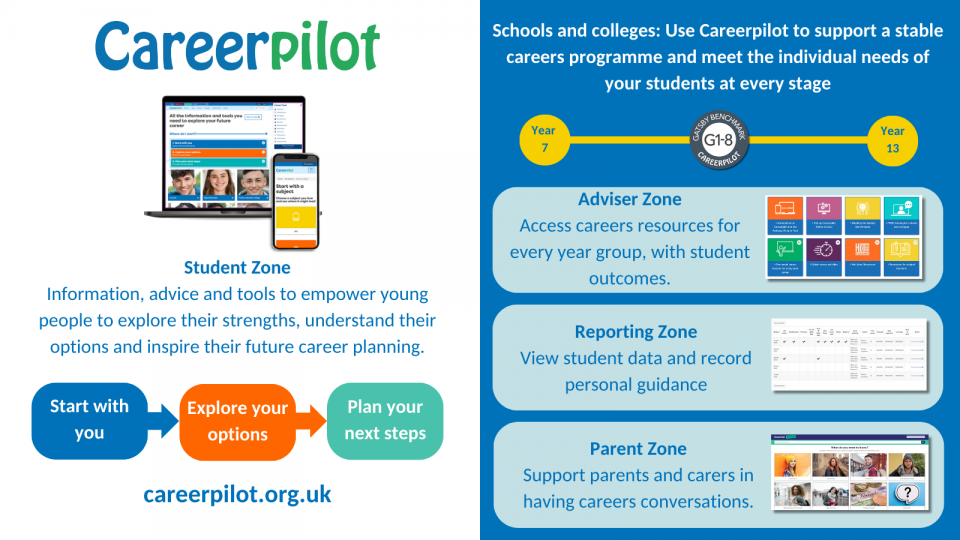
Careerpilot Student Zone
Careerpilot can be used by ALL young people aged 11-19 in schools, colleges and independently. The site helps students develop career skills so students can manage their career decisions as they go through life. We do this through showing students the three-stages they can always follow whenever they make a career decision.
- Start with you
- Explore your options
- Plan your next step
The site includes tools and activities students can use at every stage of this process, as well as information and advice on all progression pathways.
- In 'Start with you' students can complete quizzes to help explore their personal motivations - subjects they love, values, personality types, and skills.
- In 'Explore your options' students can explore choices by age or through information on 51 job sectors/900+ job profiles (which include national and regional Labour Market Information), through using course and apprenticeship vacancy search tools or by viewing video stories (more than 1000 in the site).
- In 'Plan your next step' students can access their full Career Tools report, their Skills Profile (mapped to Skills Builder) and also use a simple action planner.
Students can create an account on Careerpilot, which they own until they are 20, and then use their Career Tools to personalise their choices, save quiz results and build their report - which moves up annually and can be 'ported' to another provider. If your school is in the funded area or is a subscriber, students will be able to add themselves to your school or college at registration (your provider's name will be added to the drop-down list) and all the data they generate as they build their Career Tools report will be available for you to view in the Reporting Zone.

Parent Zone:
Parents have access to the Careerpilot Parent Zone - which has answers to questions parents are frequently asking with advice and additional useful links so they feel informed and able to support their young person.

Adviser Zone:
When you have set up an admin password you will have access to a range of resources in the Adviser Zone, including:
5 week careers lessons for every year group - mapped to the CDI, Equalex Modern Work Experience and Skills Builder frameworks.
- Year 7 - Exploring jobs
- Year 8 - Know yourself, know your skills
- Year 9 - Know your KS4 options
- Year 10 - Exploring post 16 options and securing work experience
- Year 11 - Preparing for post 16
- Year 12/13 - Choosing post 18 options and applying
Quick careers activities - includes assembly slides and short lessons suitable for tutor time
Hot Job LMI resources - including posters, images and activities to raise awareness of growth industry sectors
Resources for subject teachers - to make the link to careers across the curriculum

Reporting Zone:
With an admin password you can also access data reports showing the job sectors/jobs your students are interested in, their skills, values, subjects they love and course choices. To get the best data in the reports, your students will need to have registered/be signed in and be saving things they are interested in to their Career Tools.

Supporting students with SEND
Careerpilot includes a SEND section where students can access specific information about:
- Foundation Learning
- Studying in a further education college
- Studying in higher education
- Supported internships
- Accessible career videos
- Links to offers with local authorities in the South West
- Useful links
Careerpilot's Strengths and Values Quiz features ADHD, Autism and Dyslexia as categories for students to choose. They will find information about how they can use their strengths and apply them to a range of different jobs.
Careerpilot has created a SEND Gatsby map which shows which parts of site can be used to meet the Gatsby Benchmarks for SEND students.
Other useful links to support advisers working with students with SEND
- Disability Rights UK – Careers Guidance for young people with SEND
- Careers and Enterprise Company - SEND resources
- UCAS - Careers advice and guidance activities to support students with SEND
Building Essential Skills

As a partner of the Skills Builder Partnership, Careerpilot makes reference to eight essential skills that students need to build to prepare them for the world of work.
You will see the skills referenced as part of the Careerpilot Skills Profile as well as on our dedicated skills page, with links to the Skills Builder Framework which breaks these skills down into individual steps to support progression. We have been accredited with Skills Builder Level 3 Impact award in recognition of supporting students to practice their skills as part of our careers lessons.

View a short video introduction to Careerpilot
This 13 minute video provides a general overview of the full Careerpilot platform, including a guide to the main information, tools and resources in the student, parent, adviser and reporting zones.